
What is CLS optimization? Why is it important? How to measure CLS and which methods are improved? With the most important visual stability problems in the web site architecture, we have taken the solution paths in detail and advanced.

Cumulative Layout Shift (CLS) is one of the most critical metrics that directly affect user experience in modern web performance measurement. It expresses how stable the visual elements remain during the loading process of the web pages. For websites only emphasizes that page speed is not enough, but also visual layout should be consistent. Thanks to useful information about CLS optimization, it is possible to achieve significant improvements in metric.
Users expect a fixed and predictable structure while browsing a website. Yet problems such as slippage of contents, incorrect clicks, disruption of reading flow damage user experiences. The general user satisfaction reduces the site’s re-purchase rate. Therefore, CLS nozzle directly affects conversion rates on content intensive sites. Web Design Thanks to useful information about CLS optimization, it is possible to get beautiful results on these issues.
CLS is one of the basic ranking signals in Google’s Core Web Vitals system when we handle basic SEO optimizations. Moreover, this metric is not only a technical performance indicator. It is also a criterion that measures user experience quality. That’s why CLS improvement in modern website design is as important as speed optimization.
What is Cumulative Layout Shift (CLS)?
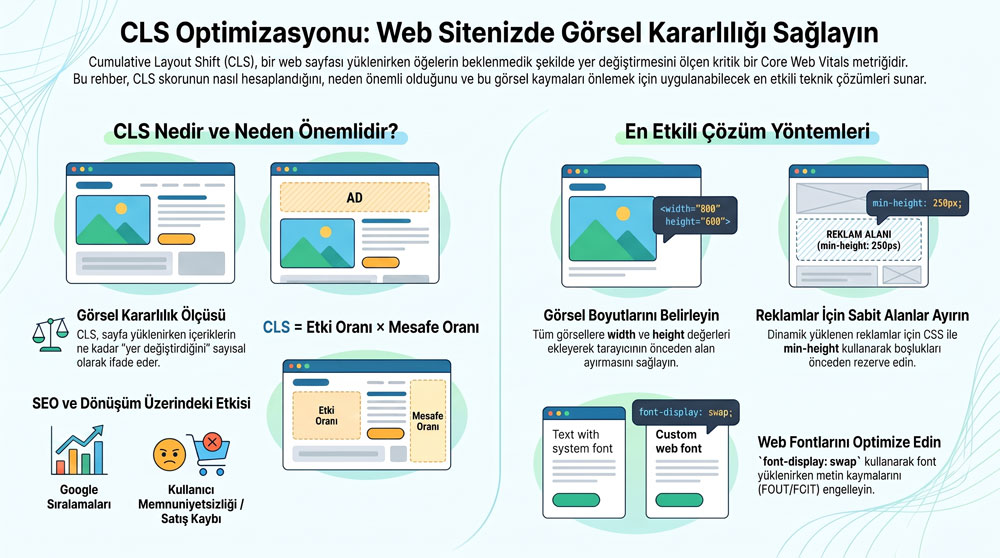
To express short, Cumulative Layout Shift (CLS) is a Core Web Vitals officer that measures unexpected visual slips that are formed when installing a web page or interacting with the user page. Simply express, CLS means how much "change" content on the page. For example, when a user reads an article, the text suddenly points down slip to a high CLS value. Or the displacement of a button is also caused by the same problem.
CLS from this care is a critical metric in terms of user experience. Because it directly determines the stability of the page. Indeed, users expect a fixed and predictable interface. The slide of page items leads to incorrect clicks, disruption of reading flow, and overall a bad user experience. This situation significantly reduces conversion rates on e-commerce sites. So useful information about CLS optimization is critical in e-commerce site optimization.
Basic SEO High CLS score, if we will handle in regard, negative effects of search engine visibility. Because it expresses a bad user experience and this situation causes the site to exit the sub-orders in corresponding queries. For example calls like "WordPress site acceleration" or "site acceleration techniques" are quite common in the digital world. CLS optimization in optimization works such as site acceleration techniques or WooCommerce acceleration is necessarily included.
The theme structure, visual sizing deficiencies and plugins in content management systems such as WordPress or Wix are among the most common causes of CLS issues. Moreover, it is possible to create visual stability problems even if the speed performance is good in technically accurate structured sites. In such cases it is possible to provide necessary improvements with useful information about CLS optimization. The website optimization process is one of the basic requirements of modern web performance standards, keeping CLS value low on both desktop and mobile devices.
CLS’s Place for Core Web Vitals
Generally speaking, CLS is one of the three basic criteria that measures visual stability in Google’s Core Web Vitals metrics. Indeed Core Web Vitals system is installed on 3 main performance signals, including LCP (Largest Contentful Paint), INP (Interaction to Next Paint) and CLS. These metrics measure the user experience of a website directly. That’s why Google has an important place in ranking algorithms.
CLS among CWV metrics evaluates how stable the content remains during the loading process of a page. So the page is opened or the user measures that the contents on the go are lost. Therefore CLS, only Web site acceleration not for visual balance and user comfort. Indeed, a site can be opened fast, but the user experience will be bad if the contents are constantly changing.
The importance of CLS on WordPress-based sites is greater. Specifically, WordPress site acceleration plugins or the dimensions of visuals in Cache systems lead to dynamic content late loading and font changes CLS issues. In the same way, WordPress becomes more pronounced due to mobile screen sizes in mobile site acceleration works. But if visual stability is ignored, CLS score remains high.
How to Measure CLS Score?
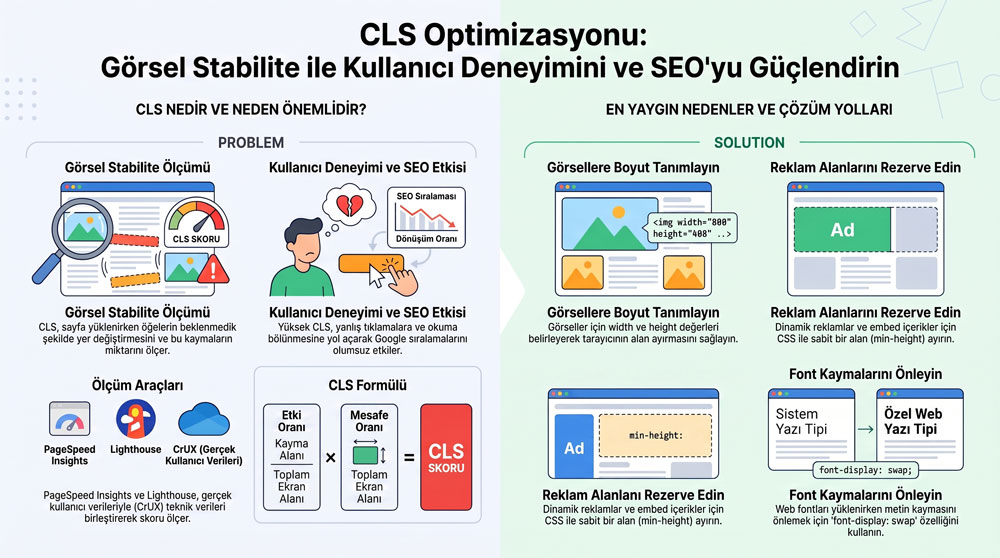
It is possible to take advantage of different tools to measure CLS score. The most important among them PageSpeed Insights test. This tool shows the CLS result by combining both Lighthouse data and real user data. In the upper part, lab data is located in the subsection, field data, meaning real user experience. In this way, not only technical testing, real performance is also easy to analyze. So this tool is one of the most important tools in CLS optimization process.
Another of the most common tools for CLS measurement is Lighthouse. Chrome is located in DevTools and calculates CLS score by analyzing the page in a controlled environment. This method is known as "lab data" and measures the performance of the page's first load instantly. It is mainly used in the development phase of website speed increasing and overall website acceleration techniques. Ki is an important point in the context of useful information about CLS optimization.
The third important source to calculate CLS score is CrUX (Chrome User Experience Report) data. Indeed, CrUX uses anonymous performance data from visits to real Chrome users. This data set shows how stable a site is for real users. It is directly effective in Google ranking system. You can also evaluate it within the scope of useful information about CLS optimization.
How Does CLS Calculator Work?
In short, CLS is calculated on two basic components while measuring visual stability on a web page. The first impact of them is fraction, meaning the effect rate. The other is the distance fraction, meaning the distance rate. These two values appear CLS score when multiply. Thus, the size of layout slips on the page is numerically revealed. This calculation is critical in the process of improving overall website acceleration techniques and user experiences.
Impact fraction value refers to how much space is covered in viewport (View area) of the affected area during a layout shift. So on the page, it tells about the total area of the sliding elements. For example, if a visual or advertising area affects a large part of the page, the impact fraction value increases. This is a common problem especially on sites where dynamic content is dense. That’s why it comes to a frequent agenda in web site acceleration work. Of course, it is one of the most important focal points under useful information about CLS optimization.
Distance fraction measures how much the slippery element moves. Indeed, this distance is proportioned to the largest size (width or height) of viewport. For example, if a buton or visual down is lost a big distance, the distance fraction value increases. And this situation directly affects user experience. So web site acceleration techniques and SEO optimizations The problem in insufficient sites becomes more pronounced.
CLS score formula:
CLS = Impact Fraction × Distance Fraction
This formula refers to how much visual inconsistentness on a page affects both the space and how much it moves. Therefore, not only speed optimization, visual layout optimization is also important. In particular, the use of visuals on WordPress-based sites increases the CLS score from after advertising areas.
Effect of Visual Size on CLS
Visuals are one of the most important elements that affect CLS value. Because when installing a web page, the browser causes the content to change if it does not know how much visual will be placed. This disrupts visual stability directly and increases CLS score.
Generally speaking, the most common cause of CLS problems is that visuals are not the width and height values. The browser sliding the existing content down or up when it comes to visual when it comes to no space on the page until the visual upload. Especially blog pages, e-commerce product pages and homepages are more damaging than this problem.
From this care, it is not only an aesthetic preference to size the visuals correctly. It is also a mandatory optimization step for SEO and performance. A correct visual content management Home Provides a more professional user experience in both site acceleration work and general website development.
CLS Problems of Ads and Embed Contents
Adler and embed (gömülü) content has an important place among the reasons that increase CLS value. Because these content often comes to DOM dynamically after page loading. And since there is no pre-order separation, CLS causes the increase of the civility. The browser sliding the page layout down or upwards as it does not know the size of these contents in advance.
Especially advertising networks change page content when there is no fixed space as it advertises different sizes. This disrupts both user experience. Increases both CLS score. The same problem applies to YouTube videos, social media embeds, map widgets and third party iframe contents.
The most effective method to prevent CLS problem in this regard is to distinguish a pre-fixed place for advertising and embed areas. This usually takes place with CSS with min-height or aspect-ratio. For example, giving at least 250 px height in an ad field, creating an empty space at loading time. Thus, the slip does not occur when it comes to content.
Embed is a similar approach for content. For example, identifying a fixed container size for components such as YouTube videos or maps greatly prevents the problem of layout shift. You also need to use placeholder (place holder) in lazy load contents. Ki is also very important in the context of useful information about CLS optimization.
FOIT Problem with Web Fonts and FOUT
Web fonts in modern web design brand identity and visual quality plays an important role in regard. However, due to lack of optimization, CLS score increases. The main reason for this is FOUT (Flash of Unstyled Text) and FOIT (Flash of Invisible Text).
In case of FOUT, the browser uses the system font until the web font is installed. When the web font arrives, it regenerates the text. This causes slippage in page layout by changing the width of font blocks. In the case of FOIT, it is invisible on the text page until the web font comes. When the font arrives suddenly and again the layout change occurs. Both scenarios also negatively affect CLS score.
This problem is more pronounced especially in content intensive sites. Indeed, the font change on blog posts, news sites and e-commerce pages affects all page flow. For this reason, web font management is also one of the critical topics when making CLS optimization. Moreover, this problem is more common in WordPress-based projects. Because many themes and plugins use external-source fonts. So you can evaluate them within the scope of useful information about CLS optimization.
Dynamic Content Downloads and Layout Slips
Dynamic content uploads are one of the most used techniques to enrich user experience on modern websites. However, not planning these contents correctly leads to increased CLS value. Especially after page installation, items from DOM change the settlement that the browser initially calculated. As a result of this, the contents slide down or upward. So this is another important point within the scope of useful information about CLS optimization.
Among the most common dynamic content examples, advertising areas are located on top rows. There are also other examples of notice boxes, popups, comment sections, product lists or text blocks. Such contents often come to the page with JavaScript. If there is no predisposition for these areas, the page layout is formed again. Ki causes the increase of CLS score.
On the other hand, without user interaction, suddenly added content (e.g. automatic banner or chat widgets) are the most risky structures in CLS. For such content, it is necessary to necessarily place in advance. Indeed, dynamic content management is a factor that significantly increases CLS score when it is not correctly applied. Specifically WordPress theme acceleration It is necessary to optimize these structures in processes.
Basic Methods for CLS Optimization
The most basic CLS optimization techniques identify the visual dimensions correctly at the beginning. Indeed, it provides an important improvement to determine the width and height values for all visuals or use the objective-ratio with CSS. In this way, the browser separates the necessary space before the visuals come, and then the slip does not occur. So this method is one of the most effective solutions in improving user experiences.
The second most effective method for CLS optimization is to create fixed space for advertising and embed contents. Indeed, the page layout sliding when ads or iframe structures are dynamically formed. For this reason, it is useful for pre-location of min-height or placeholder structures. Ki is very important in the context of useful information about CLS optimization.
The third method is web font optimization. Indeed font-display: the use of swap prevents the slip of text during font loading. Moreover, FOUT/FOIT minimizes complex shift problems. Also upload critical fonts in advance (preload) significantly lower CLS value.
The fourth method is dynamic content management. After uploading the page, there should be a fixed area. Otherwise, content slips occur during user interaction. This situation is particularly useful in matters such as WooCommerce speed optimization or Wix site speed improvements. Because these systems often lead to speed issues in dynamic structured content production.
Finally in this context, using CSS animations correctly is directly effective on CLS. Indeed, the ball prevents page recalculation, instead of the features that trigger layout like left. When all these techniques occur together, CLS score drops seriously. This is both on the desktop and speed optimization on mobile u and improve user experiences.
Advanced Level Performance Optimization Techniques For CLS
- You can manage measurement and writing on DOM to block Layout thrashing (read/write operations) in separate batches. Because getBoundingClientRect produces browser forced reflow when style works in the same frame with layout-trigger APIs. This situation increases the risk of layout shift.
- The use of CSS containment (especially contain: layout paint;) provides component-based rendering insulation. This technique prevents unnecessary calculations on parent DOM tree by limiting browser’s reflow limits.
- The rendering-blocking resource chain minimization under Critical rendering path optimization is quite useful. Especially in the process of CSSOM + DOM interleaving, it minimizes the number of blocks stylesheets. This method allows CLS score to minimization in the initial rendering phase.
- Hydration-based frontend architectures (SSR+CSR structures such as React, Vue, Next.js) produce hydration mismatch problems CLS. Structural diff between Virtual DOM triggers layout recalculation process. In such cases, optimization with deterministic rendering pattern is possible.
- With Intersection Observer API, placeholder geometry is quite useful in lazy-load elements. Because in observationr trigger, DOM produces new nodes. So the aspect-ratio of the skeleton UI is controlled and intrinsic is quite useful for you to stay intrinsic.
- Implicit track creation behaviour in CSS grid and flexbox combinations increases CLS risk. The layout jump occurs especially during grid recalculation in auto-fit and auto-fill uses. Therefore, open grid template definition is an effective method. It also needs stabilization of fractional unit accounts.
- The font metric override (font-size-adjust and descriptor) for FOIT/FOUT control in the web font loading strategy is quite useful. This technique neutralizes glyph metric mismatch-source layout shift between fallback font and web font.
- The use of decoding="async" in Image decoding pipeline separates code blocks from main thread. However, in case of incorrect implementation, image generates late insertion layout shift. Therefore, intrinsic ratio box + decode pre-commit pattern should be used together. These are also useful in your assessment within the scope of useful information about CLS optimization.